
In het Nederlands: het AVG-verwerkingsregister (werkboek) →
EU GDPR Records Workbook
Your Article 30 record, processors, breaches, requests and retention in one Excel workbook.
- Instant download
- 14-day money-back guarantee
- VAT invoice by email
- iDEAL or card
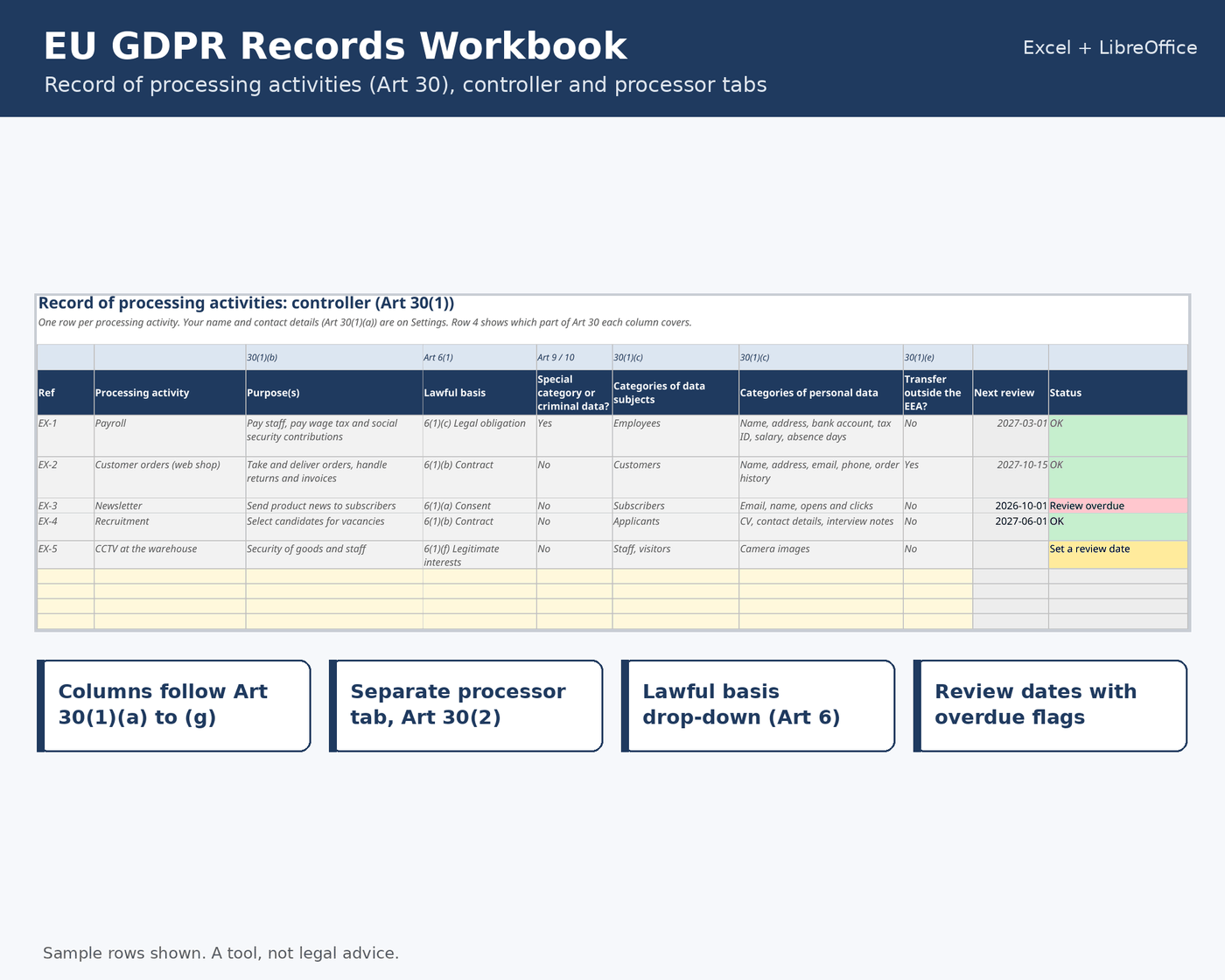
A spreadsheet for small organisations in the EU that want their GDPR records in one place: a record of processing activities with a column for each part of Article 30(1), a separate processor tab for Article 30(2), and five more registers that calculate deadlines and flag what is overdue. Grey example rows show how to fill it in. Start in 30 minutes with the Instructions tab.
Instant download after payment: one .zip. Workbook or pack? The comparison is just below.
Workbook or pack?
Take the workbook if you only need the records. Take the pack if you also have nothing on paper yet for staff privacy, breaches, requests or retention.
Workbook €19
- The Excel workbook: 10 tabs, 7 registers (Article 30 record as controller and as processor, processors, breaches, requests, retention, DPIA screening)
- A short read-me (text file)
The .zip holds 3 files: GDPR-Records-Workbook-EU.xlsx, READ-ME.txt, LICENSE.txt
Buy workbook – €19 incl. VAT →Pack €39
- The same Excel workbook
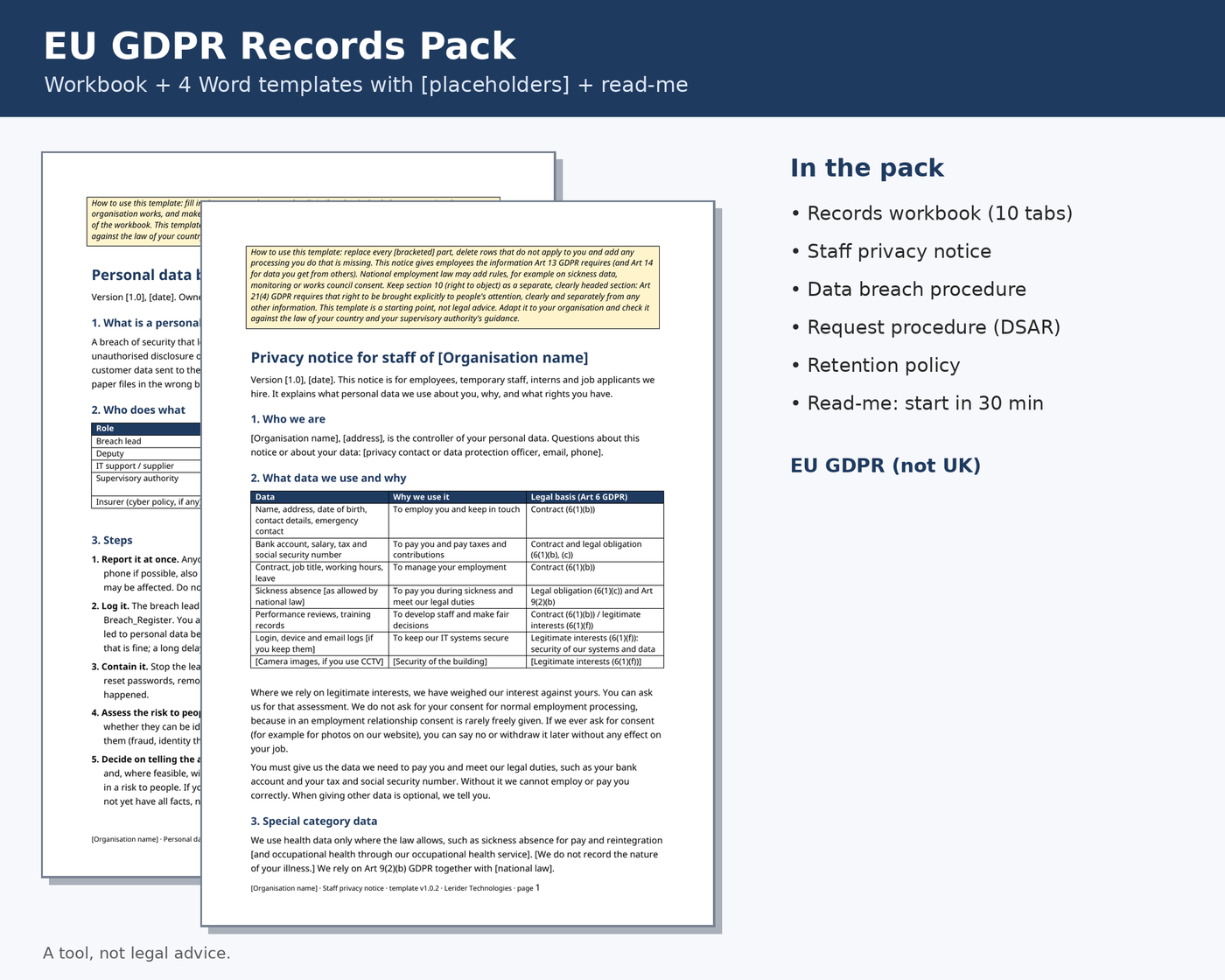
- 4 Word templates: staff privacy notice, breach procedure, data subject request procedure, retention policy
- A two-page read-me (PDF and Markdown)
The .zip holds 8 files: 00-Read-me-first.pdf and .md, 01-GDPR-Records-Workbook-EU.xlsx, 02-Staff-privacy-notice.docx, 03-Personal-data-breach-procedure.docx, 04-Data-subject-request-procedure.docx, 05-Retention-policy.docx, LICENSE.txt
Buy pack – €39 incl. VAT →What's inside the workbook (€19)
Ten tabs, seven of them registers with 200 pre-formatted rows each, 13 drop-down lists and 14 example rows. No macros, no internet connection. Opens in Excel 2010 or later and LibreOffice.
- Instructions and Settings: start-in-30-minutes steps, a colour key, your organisation's details (Art. 30(1)(a)), your supervisory authority, and an overview that counts overdue reviews, unsigned DPAs, breaches past the deadline, open and overdue requests, retention actions due and DPIA flags.
- Record of processing activities, controller (Art. 30(1)), 19 columns: purposes, lawful basis, special category or criminal data and the condition used, categories of data subjects, personal data and recipients, transfers outside the EEA with the safeguard, time limits for erasure, security measures, processors used, review dates and status.
- Record of processing activities, processor (Art. 30(2)), 12 columns, for when you process personal data on behalf of your clients.
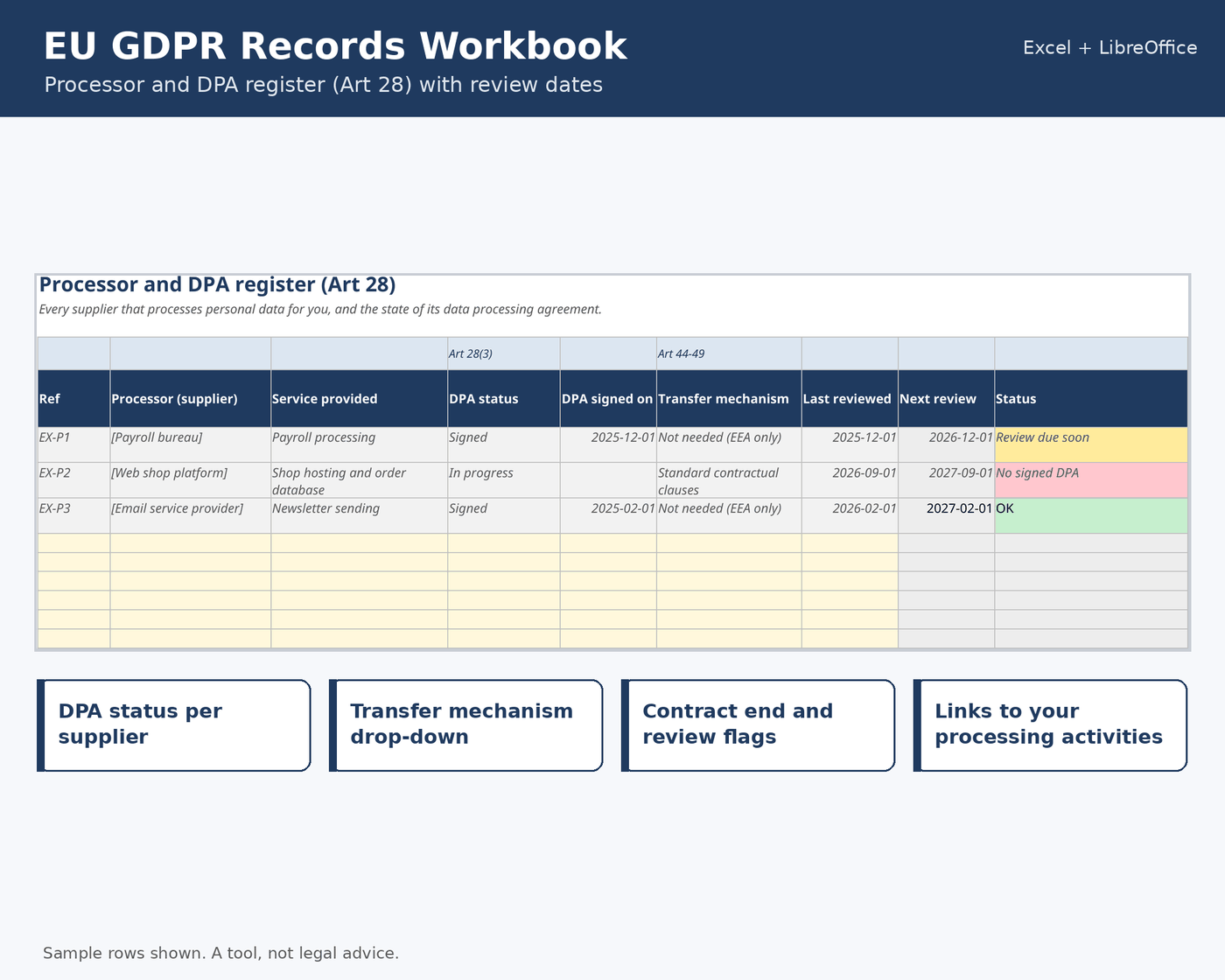
- Processors (Art. 28): your suppliers that handle personal data, DPA status and date, sub-processors, where data is processed, transfer mechanism and security evidence.
- Breach register (Art. 33 and 34): a 72-hour clock from the moment you became aware, hours left, a late flag with room for the reasons for delay, and fields for why you did or did not notify the authority or tell the people affected (Art. 33(5)).
- Request log (Art. 12(3), Art. 15 to 22): the one-month deadline, moved past weekends and the public holidays you type in, a two-month extension field, days left and an overdue flag.
- Retention schedule (Art. 5(1)(e)): period, start point, reason, action at the end, owner and a delete-or-review date.
- DPIA screening (Art. 35): the nine criteria from the WP29 guidelines on DPIAs (WP248 rev.01, endorsed by the EDPB). The tab counts the criteria you tick; you record your decision and reasoning. A screen, not a DPIA.
The pack adds four Word templates (€39)
- Staff privacy notice: Art. 13 information for employees, with a data and legal basis table.
- Personal data breach procedure: roles, eight steps, what a notification must contain (Art. 33(3)) and what processors must do (Art. 33(2)).
- Data subject request procedure: deadlines, how to recognise a request, seven steps and a table per right (Art. 15 to 22).
- Retention policy: how to set a period, an examples table, what happens at the end (including backups), exceptions and checks.
- Read-me (PDF and Markdown): what is inside, start in 30 minutes, how the workbook calculates, and its limits.
Each template is A4, two pages, with [bracketed] placeholders and a short "how to use" box on top. The workbook in the pack is the same file as the €19 workbook.
Read a sample document (PDF, 4 pages): the personal data breach procedure and the procedure for requests from individuals, two of the pack's Word templates, exactly as they come in the pack. These templates are in the pack only, not in the workbook on its own.
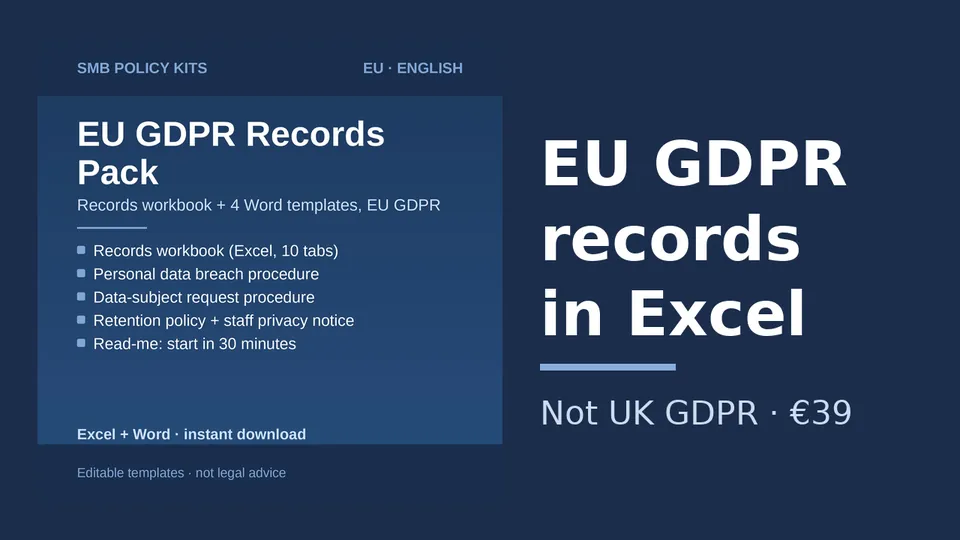
Previews (click to enlarge; sample rows shown)
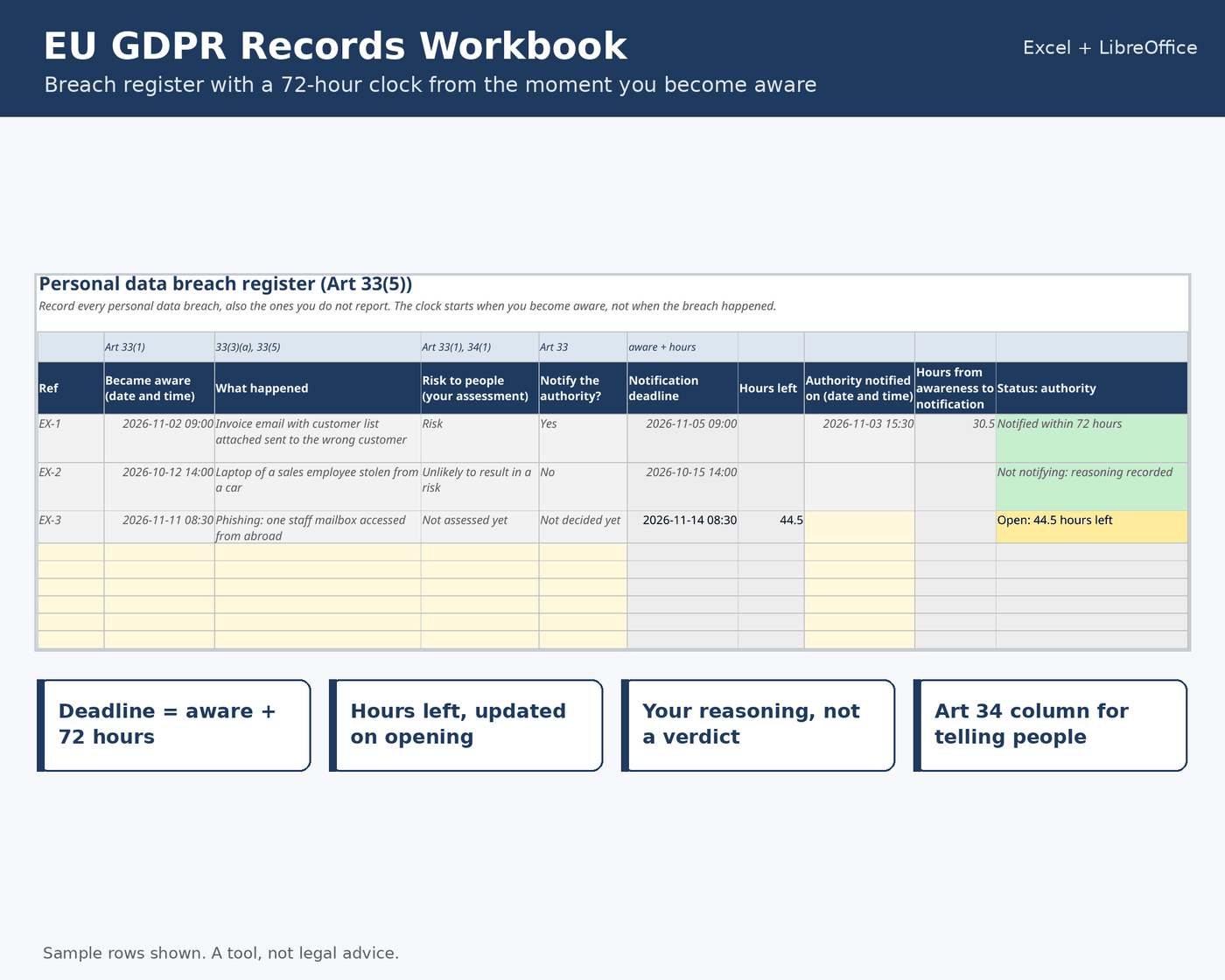
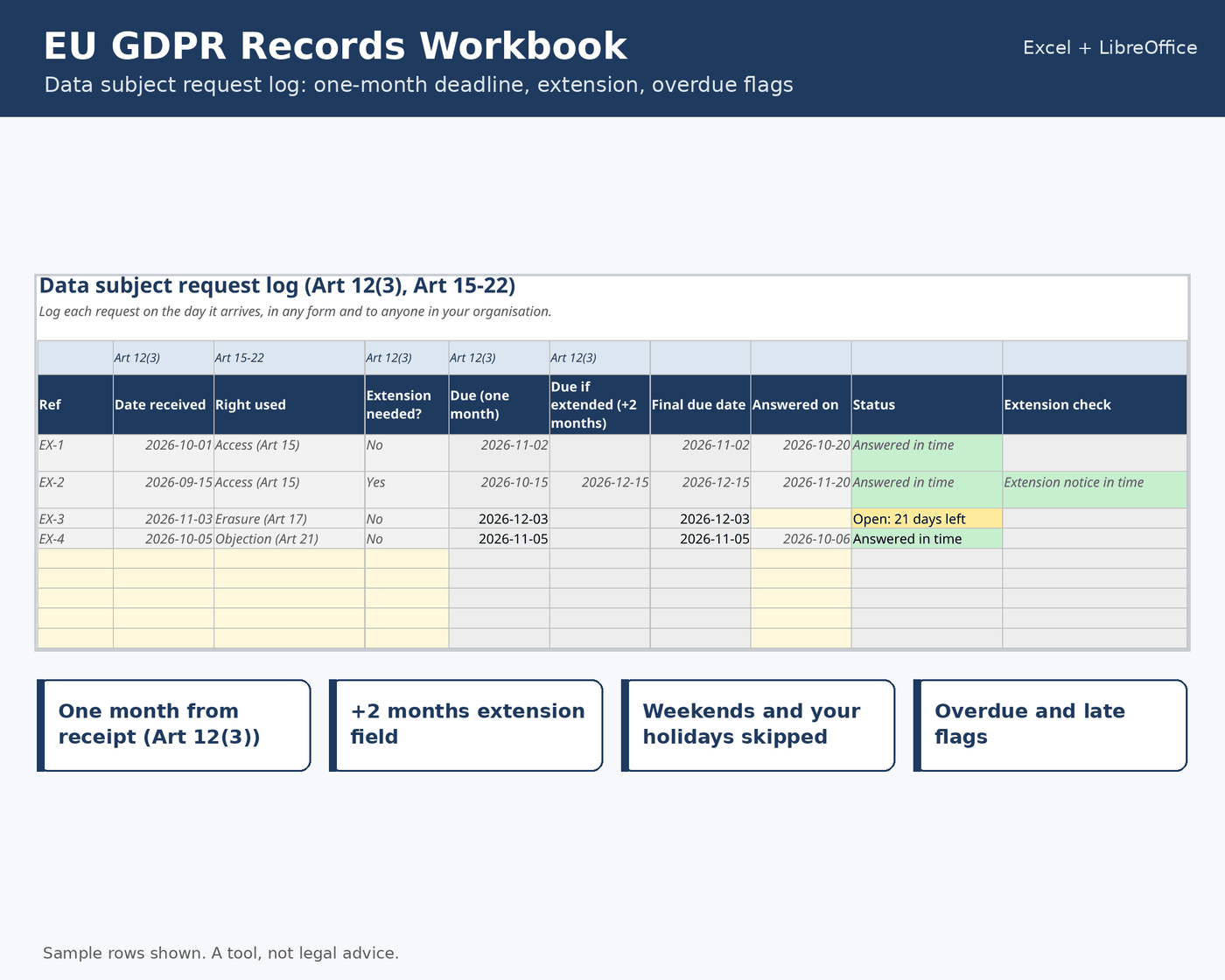
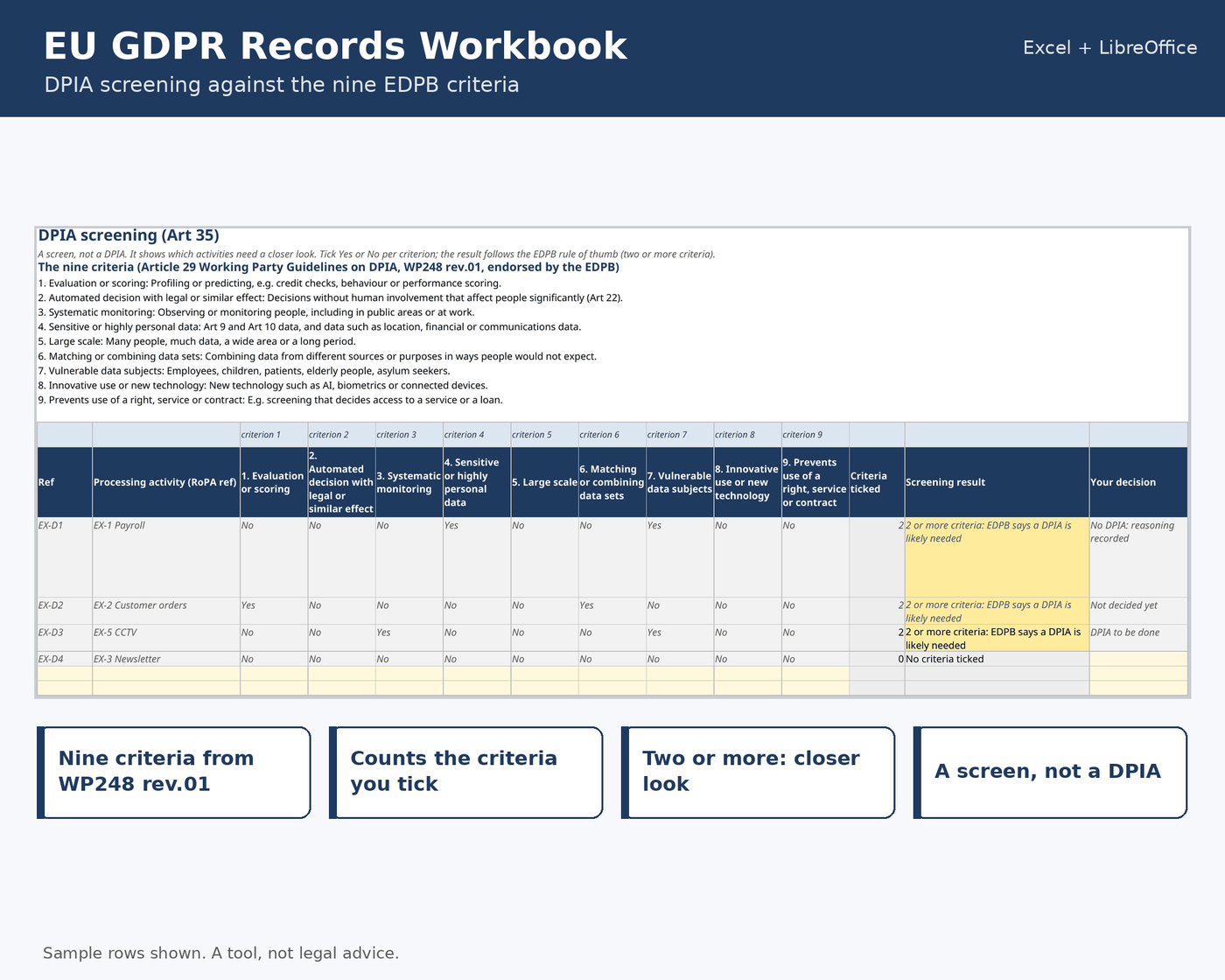
Honest about the limits
- It is a tool, not legal advice. It organises your records and calculates dates. It does not decide whether a breach must be reported or whether you need a DPIA: it counts and flags, you decide and write down why.
- Built for the EU GDPR (Regulation (EU) 2016/679), not UK GDPR. It does not know your national rules, such as employment law, tax retention periods or your authority's own DPIA list.
- Article 30(5) today exempts organisations with fewer than 250 persons, unless the processing is likely to result in a risk to people's rights and freedoms, is not occasional, or includes special category or criminal offence data. Regular processing such as payroll is not occasional, so most small businesses keep a record for at least part of what they do. There are EU proposals to widen the exemption; they are not in force as of November 2026. The workbook does not tell you whether you are exempt.
Who this is for
- Small EU businesses, associations and practices that have to show their GDPR records and do not want a subscription tool for it.
- Office, HR or IT owners who already keep privacy notes in loose files and want one workbook with dates that flag themselves.
- Small service providers that process personal data for clients and need a processor record (Art. 30(2)).
Who this is not for
- Organisations under UK GDPR: the workbook follows the EU GDPR.
- Organisations that need approval workflows or a full audit trail of who changed what: a spreadsheet does not do that, privacy management software does.
- Anyone looking for someone to fill it in or to judge their processing: this is a tool you fill in yourself, not advice.
FAQ
- Workbook or pack?
- The workbook (€19) holds all the registers. Take the pack (€39) if you also need the staff privacy notice, a written breach procedure, a request procedure and a retention policy to adapt.
- Does this make us GDPR compliant?
- No file can promise that. The workbook helps you keep the records the GDPR asks for and see what is overdue; whether your processing itself is lawful is a separate question for you, and where needed a lawyer or your supervisory authority.
- Do we need an Article 30 record at all if we have fewer than 250 staff?
- Often yes, for part of your processing: the exemption in Art. 30(5) does not apply to processing that is not occasional, likely to result in a risk, or includes special category or criminal offence data. Our guide to Article 30 records for a small business explains the test with examples.
- Is it for UK GDPR?
- No. It follows the EU GDPR. Supervisory authority examples are the Autoriteit Persoonsgegevens, CNIL and BfDI.
- Which software does it work in?
- Microsoft Excel 2010 or later and LibreOffice. No macros. The Word templates are .docx.
- We also need written IT security rules.
- The record asks for a general description of your security measures (Art. 30(1)(g)). If you have none on paper yet, the IT Policy Pack for Small Businesses (EU) (€39) has the policies to point to.
- Licence
- One organisation, including its group companies. Do not resell or share the files.
Further reading (free articles)
- Free GDPR Article 30 record check
- GDPR breach 72-hour deadline calculator
- DSAR response deadline calculator (GDPR one month)
- Personal data breach procedure template: what to include
- Data retention policy template (GDPR): what to include
- Employee privacy notice (GDPR): what to include
- Subject access request (DSAR) procedure: what to include
- GDPR Article 30 records for a small business
- Incident log template: free Excel, and what to record
- Using AI on personal data? Free check: does that AI use need a DPIA? (GDPR + AI Act)
A tool, not legal advice, and no guarantee of compliance with any law. Written for the EU GDPR (Regulation (EU) 2016/679), A4. Lerider Technologies is not affiliated with the EDPB or any supervisory authority. Prepared with the help of AI under the direction of Lerider Technologies and checked against its references before publication.
Refunds: if the workbook or pack isn't useful for you, email hello@lerider.com within 14 days of purchase for a full refund, no questions asked.
At checkout you accept our terms (Dutch, with an English summary). See also refunds and privacy.